
Lambda
什麼是 lambda ?
AWS Lambda 是一項運算服務,可讓您執行程式碼,無需佈建或管理伺服器。 Lambda 在高可用性的運算基礎設施上執行您的程式碼,並執行所有運算資源的管理,包括伺服器與作業系統維護、容量佈建與自動擴展以及記錄。
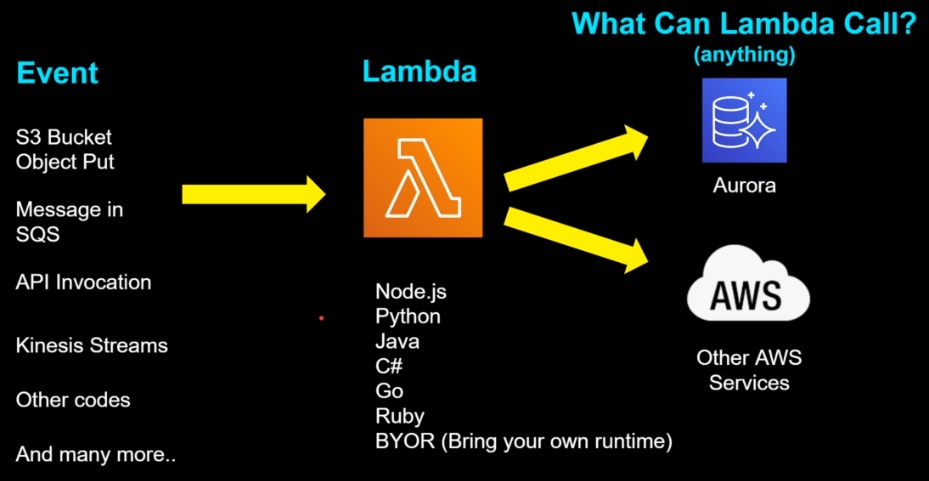
Lambda 功能
- 用自訂邏輯擴展其他 AWS 服務
- 僅需按實際用量付費
- 使用 Lambda 函數時,您只需為處理的請求及執行程式碼所需的運算時間付費。
- 靈活的資源模型
- 選擇要分配給函數的記憶體數量,AWS Lambda 便會按比例分配 CPU 功率、網路頻寬和磁碟輸入/輸出 (I/O)。
- 支持多種語言:AWS Lambda 支持多種常用的編程語言,例如: Node.js、Python、Java、Go 等。
AWS Lambda 功能 -> https://aws.amazon.com/tw/lambda/features/
Lambda 建立方式
- AWS Console
- CloudFormation / SAM(Serverless Application Model) / CDK
- AWS CLI
Lambda 收費
免費
- 每月 1 百萬個請求
- 每月 400,000 GB-秒的運算時間
收費標準
- 會針對開的記憶體大小、tmp 暫存、請求數量、function執行時間…等等,來進行收費。
- lambda 定價
- lambda pricing-calculator
Memory 和 Timeout
Memory
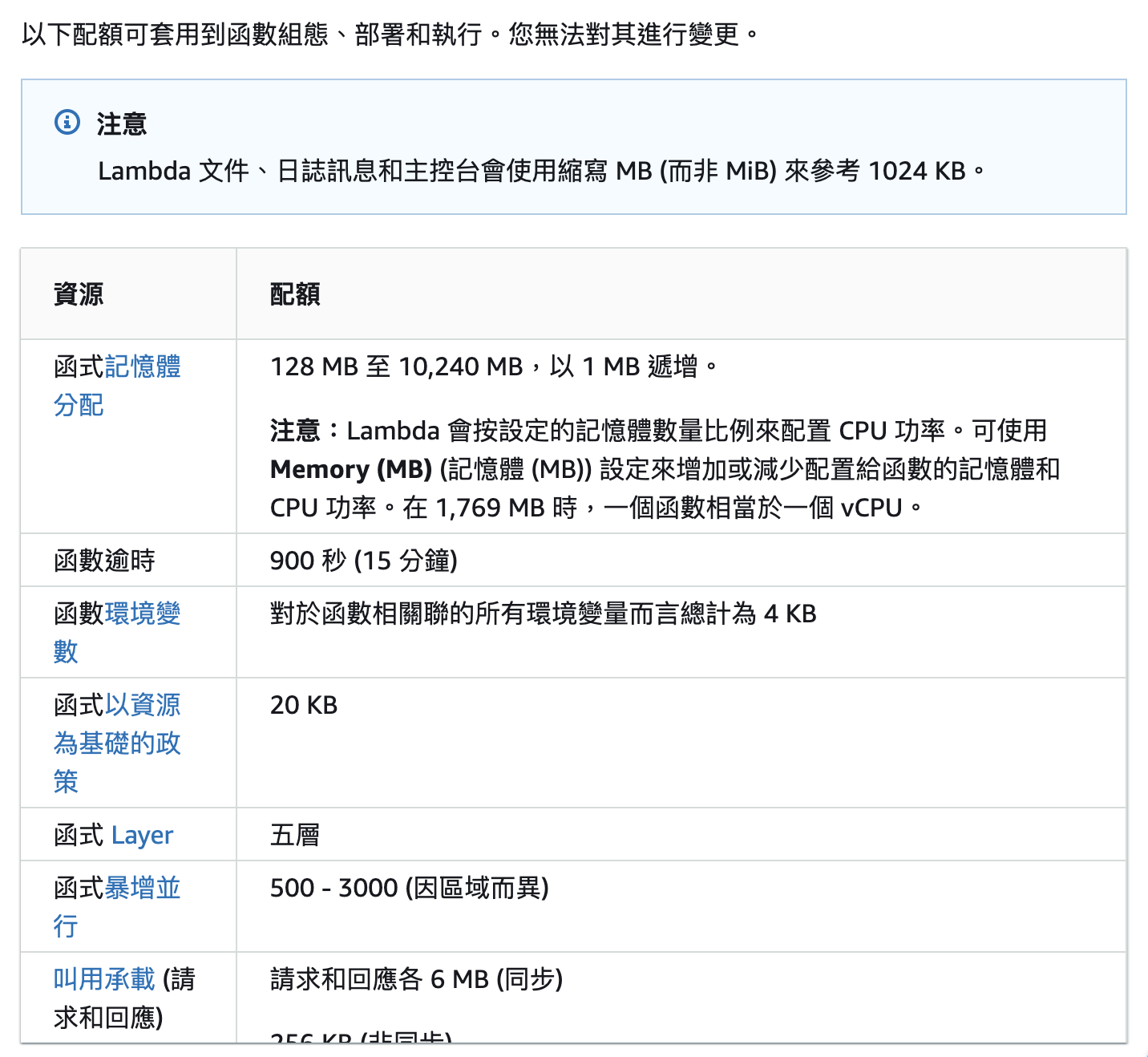
- lambda 記憶體可以設定的範圍為 128 MB 到 10,240 MB,
- 分析 AWS 資源組態和使用率指標 -> AWS Compute Optimizer
Timeout
-
預設 3 秒,可以設定的範圍為 1 秒到 15 分鐘
Lambda 限制
Lambda 也有些限制必須遵守,像是 CC 就遇到了 zip 檔案解壓縮後超過 250 MB的限制。
Lambda Layer
- layer 的路徑需要加上 /opt
- 一個 function 最多 5 層 layer
EX: 如果要讀取 layer 中的 /lib/fonts 資料夾,則需要設定為 /opt/lib/fonts
建立圖層時,必須將其所有內容綁定到 .zip 檔案封存中。可以從 Amazon Simple Storage Service (Amazon S3) 或本機電腦中將 .zip 封存檔上傳到您的層。設定函數的執行環境時,Lambda 會將圖層內容擷取到 /opt 目錄中。
cloudformation
Serverless Framework
serverless framework 會透過 serverless.yml 檔來建立 cloudformation template
We envision a world where developers can build and scale more than ever, all with the least amount of maintenance. At Serverless we are creating the tools for that.
https://www.serverless.com/about
專案建立
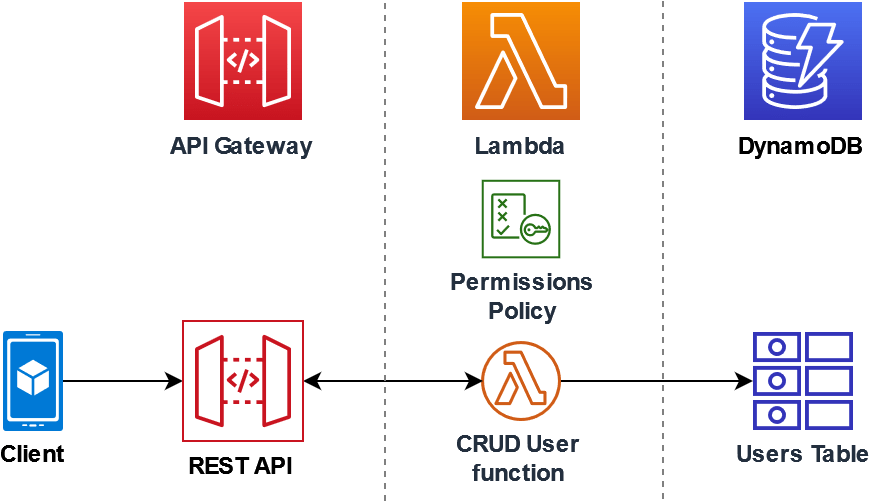
架構圖
安裝 serverless framework
npm install -g serverless
建立專案
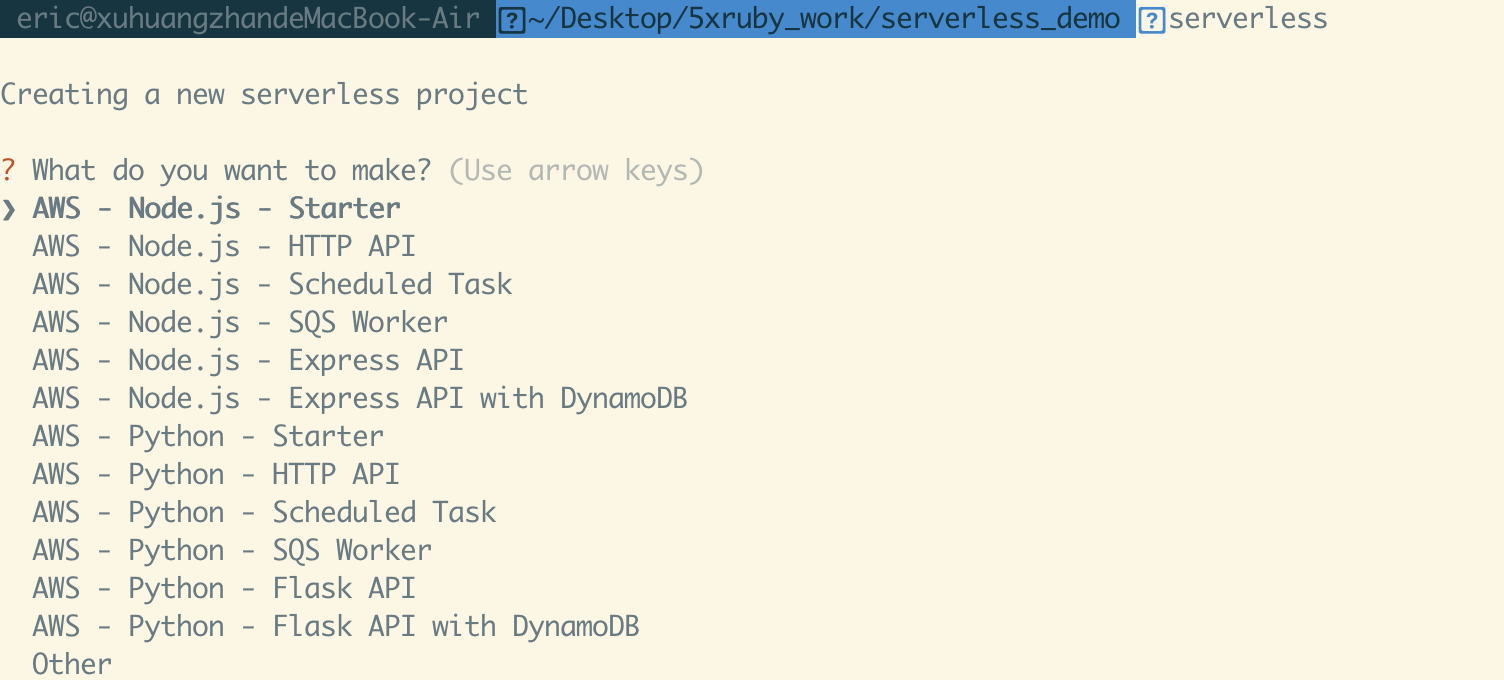
serverless template
serverless
或者直接 create
serverless create --template aws-nodejs --path serverless-demo
需要 AWS key
export AWS_ACCESS_KEY_ID=<your-key-here>
export AWS_SECRET_ACCESS_KEY=<your-secret-key-here>
常見 serverless.yml 配置
- ${self:xxx.xxx} ```yaml ${self:provider.stage} ${self:custom.exportName}
yml
provider: stage: ${opt:stage, ‘dev’}
custom: exportName: lambda-function
- ${sls:stage}
```yaml
${opt:stage, self:provider.stage, "dev"}
- ${opt:xxx} ```yaml ${opt:stage, ‘dev’}
command line
serverless deploy –stage staging
[官方文件看更多 variables 用法](https://www.serverless.com/framework/docs/providers/aws/guide/variables)

### image function 配置

```dockerfile
# Dockerfile
FROM public.ecr.aws/lambda/nodejs:12

COPY app.js ./

# You can overwrite command in `serverless.yml` template
CMD ["app.handler"]
provider:
  name: aws
  ecr:
    # In this section you can define images that will be built locally and uploaded to ECR
    images:
      appimage:
        path: ./

functions:
  hello:
    image:
      name: appimage
在 local 測試 image function
相關連結
AWS 官方文件
- 什麼是 AWS Lambda?
- lambda 功能
- Lambda 配額
- lambda 定價
- 建立和共用 Lambda 層
- 搭配使用 Lambda 與 API Gateway
- 教學課程:搭配使用 Lambda 與 API Gateway
- AWS CloudFormation 如何運作?
- Node.js 中的 AWS Lambda 函數處理常式
其他文章
- AWS Serverless 學習筆記 - 初探 AWS Lambda
- Serverless Framework 鐵人賽文章
- 使用 Node.js + serverless framework + AWS Lambda 打造可擴展、更穩定而且更經濟的架構
AWS
Secrets Manager
- 什麼是 AWS Secrets Manager?
- AWS Systems Manager Parameter Store
- AWS Secrets Manager vs Systems Manager Parameter Store
其他連結

留言